
Introduction
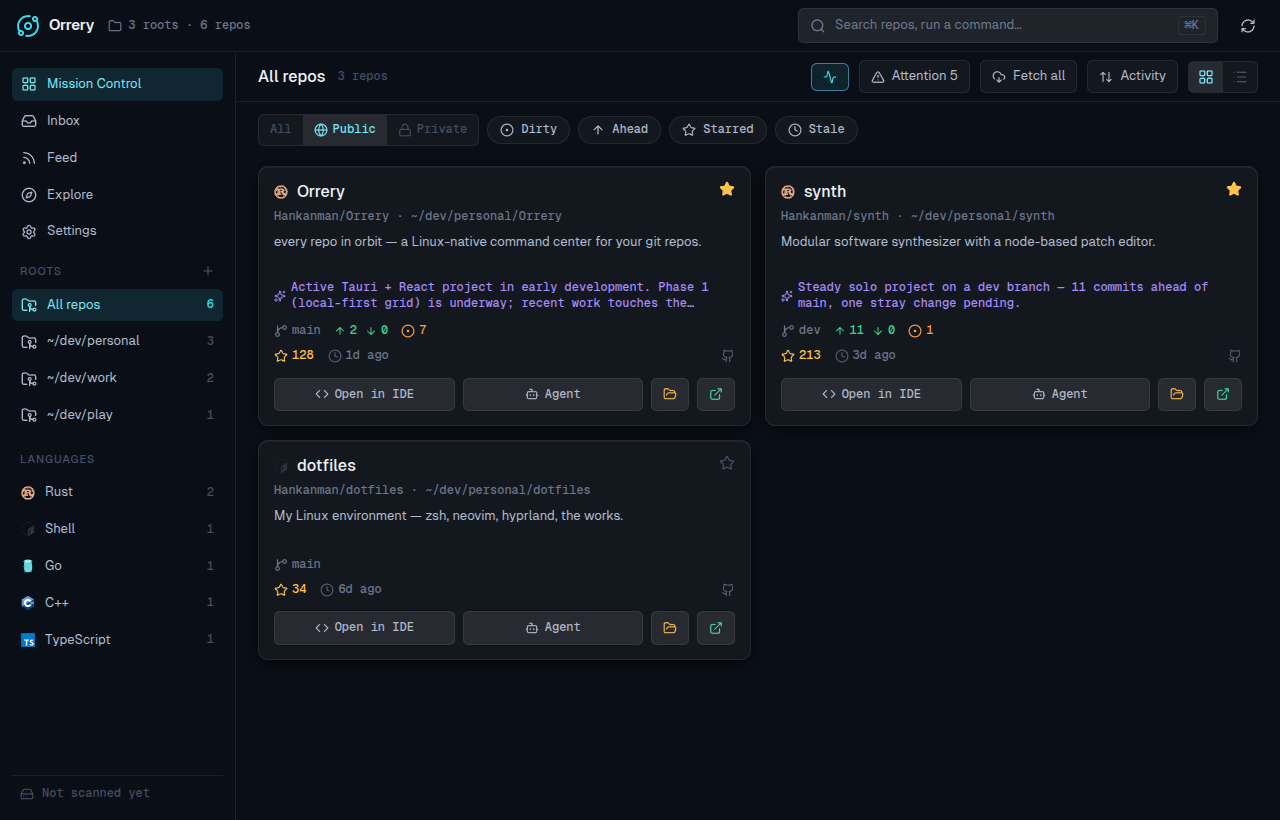
Orrery points at the directories where you keep your projects, discovers every git repo inside them, and lays them out in a dark, dense "mission control" grid. Each card fuses three sources of truth:
- Local git — branch, ahead/behind, uncommitted changes, last commit, detected language
- Your git host (GitHub, GitLab and Gitea / Forgejo / Codeberg, incl. self-hosted) — stars, topics, releases, issues, visibility
- Local AI — a synthesized "what is this / what's been happening" blurb, generated on-device
…and every card is a launchpad: one click to open the repo in your IDE, or to drop a terminal coding agent (Claude Code, Aider, Codex, …) straight into it.
Why?
There's no great workspace dashboard for Linux. GitKraken is heavy and git-focused; GitHub Desktop has no Linux build and is single-repo. Orrery is the at-a-glance morning view of everything you're working on — and the fastest way to jump back in.
Status
EARLY DEVELOPMENT
Orrery is in active early development. Packaged Linux builds (AppImage, .deb, .rpm) are published on the releases page, or you can build from source — see Getting started. Expect rough edges.
What's inside
Beyond the Mission Control grid, Orrery has grown a full command center:
- The repo drawer — branches, history, staged-diff with AI commit messages, a PR/CI panel with quick-merge, and per-repo notes with a "what changed since I last looked" catch-up.
- Fleet operations — multi-select repos for batch git ops, and a dashboard of every agent/terminal session you've launched.
- Notifications & tray — background polling for PRs, reviews, and CI, surfaced as desktop notifications and a tray glance.
- Maintenance & tools — a branch janitor for merged/gone branches, and an offline developer utility belt.
- Inbox, Feed & Explore — what's waiting on you, a release radar, and a browser for your starred repos.
- Local AI — summaries, commit messages, changelogs, briefings, and semantic search, on-device via Ollama or a bundled llama.cpp engine.
Stack
| Layer | Choice |
|---|---|
| UI | Native Rust on GPUI (Zed's GPU framework) — no webview |
| Rendering | GPU via blade (Vulkan); Wayland/X11 direct; gpui-component widgets |
| Git | git2 (libgit2, vendored) |
| Persistence | SQLite + TOML config (XDG dirs) |
| Hosts | GitHub + GitLab + Gitea / Forgejo REST/GraphQL (incl. self-hosted) |
| Local AI | Ollama or a bundled llama.cpp sidecar, over HTTP |
How it fits together
Orrery is a native Rust app on GPUI — no webview, no IPC. A three-crate workspace: orrery-core does the heavy lifting (scanning, git, host APIs, caching, AI calls), orrery-platform handles Linux desktop integration (tray, notifications, appearance), and the orrery app crate is the GPUI UI calling the core directly. A SQLite cache persists the repo snapshot and host enrichment so the grid paints instantly on launch and keeps working offline. Configuration lives in a plain TOML file under ~/.config/orrery/.
Read on for building from source, or jump into the feature tour.