
Local AI
Orrery's AI features run entirely on-device — nothing leaves your machine. There are two interchangeable backends; pick one in Settings → AI & search. When AI is off or unreachable, every AI affordance is hidden rather than broken.
What it powers
- Repo summaries — a synthesized "what is this / what's been happening" blurb on each card, generated on demand or in bulk.
- Commit messages — drafted from your staged diff in the repo drawer.
- Changelogs — summarised from recent history.
- Daily briefing — a one-line "here's where things stand" across your workspace.
- Resume catch-up — what changed in a repo since you last looked (see The repo drawer).
- Semantic search — embeddings-backed search over your repos. (Ollama backend only.)
Choosing a backend
| Ollama | llama.cpp (bundled) | |
|---|---|---|
| Setup | Install Ollama separately | Ships with release builds — download a model |
| Models | Any Ollama model | A GGUF you download in Settings |
| Embeddings / semantic search | ✅ | — (generation only) |
| Best for | Existing Ollama users, semantic search | Zero-dependency, out-of-the-box generation |
The backend selector takes effect immediately, and the panel only shows the controls relevant to the engine you picked.
Setup — Ollama
- Install Ollama and make sure it's running (default endpoint
http://localhost:11434). - Pull a small chat model and an embedding model:
ollama pull qwen3:0.6b
ollama pull nomic-embed-text- In Settings → AI & search, choose the Ollama backend, confirm the endpoint, enable AI, and pick your models. Hit Test to verify the connection end-to-end.
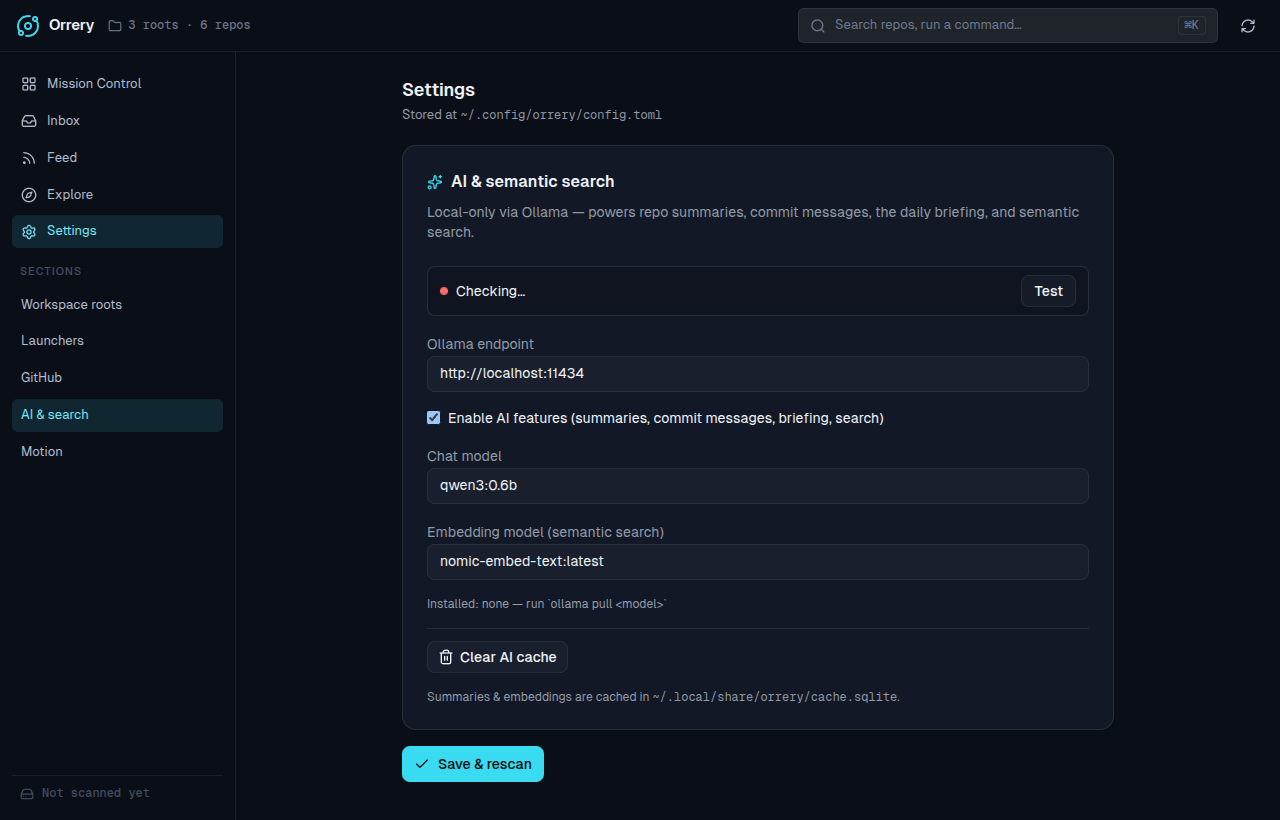
Model choice
A small model like qwen3:0.6b is plenty for the short summaries Orrery generates and keeps things fast. Point the endpoint at a remote Ollama host if you'd rather run the model elsewhere.
Setup — llama.cpp (bundled)
Release builds bundle a local llama-server engine, so there's nothing to install separately.
- In Settings → AI & search, choose the llama.cpp backend.
- Click Download model to fetch a small default GGUF (≈400 MB) into
~/.local/share/orrery/models/. You can also point it at any GGUF URL. - Enable AI and generate a summary — the engine starts on demand and shuts down with the app.
The engine binary is discovered in this order: an explicit path you set in Settings, the bundled copy unpacked into ~/.local/share/orrery/bin/, then llama-server on your PATH. If you build from source rather than installing a release, supply a llama.cpp llama-server by any of those routes.
Generation only
The llama.cpp backend serves text generation. Embeddings — and therefore semantic search — stay on the Ollama backend, so that one feature is hidden while llama.cpp is selected.
Where data is stored, and clearing it
Summaries and embeddings are cached in ~/.local/share/orrery/cache.sqlite. A summary is keyed to the repo's last commit, so it regenerates after new work lands. Use Clear AI cache in settings to drop all summaries and embeddings.
Turning it off
Uncheck Enable AI features. The grid, drawer, and toolbar drop every AI control — no empty placeholders, no broken buttons.